
Vursor: All the best of Vim in Cursor (or VSCode)
Vursor
As I am "forced" to write less Scala and more TypeScript and I want to profit from AI assistance while still being in control and writing code myself, I am switching more and more to Cursor and away from IntelliJ. At first I did not feel at home, all my muscle memory for all the vim bindings did nothing for me. I longed to go back to IntelliJ or Vim to feel the flow. But then I realised I could just port my VimtelliJ bindings to Cursor. And now all is ❤️
But first of all lets make the interface a bit nicer, hide those tabs. Once you get used to this, you never look back, so much cleaner!
"workbench.editor.showTabs": "none"Same as in IntelliJ I only use shift + tab for switching through recent files and my shortcuts, e.g. <leader>ff to find files by filename.
Alright, so after installing the VSCodeVim extension let's configure.
Note: This config works in both Cursor and VS Code, they share the same settings format.
Basic Setup
First, let's set up the essentials. Space as leader, surround plugin, highlighted yank, and some sensible search defaults:
"vim.leader": "<space>",
"vim.surround": true,
"vim.highlightedyank.enable": true,
"vim.highlightedyank.duration": 200,
"vim.replaceWithRegister": true,
"vim.hlsearch": true,
"vim.incsearch": true,
"vim.ignorecase": true,
"vim.smartcase": true,
"vim.useSystemClipboard": true,
"vim.scrolloff": 3,
"vim.visualbell": true,
"editor.lineNumbers": "relative",
We also need to tell vim which keys it should handle vs. letting Cursor handle them:
"vim.handleKeys": {
  "<C-d>": true,
  "<C-u>": true,
  "<C-f>": false,
  "<C-p>": false,
  "<C-n>": true,
}
Here are some of my favorite features
Go to Definition and Navigation
This is the most important stuff for navigation. Jump to definition, find references, peek at implementations, all without touching the mouse:
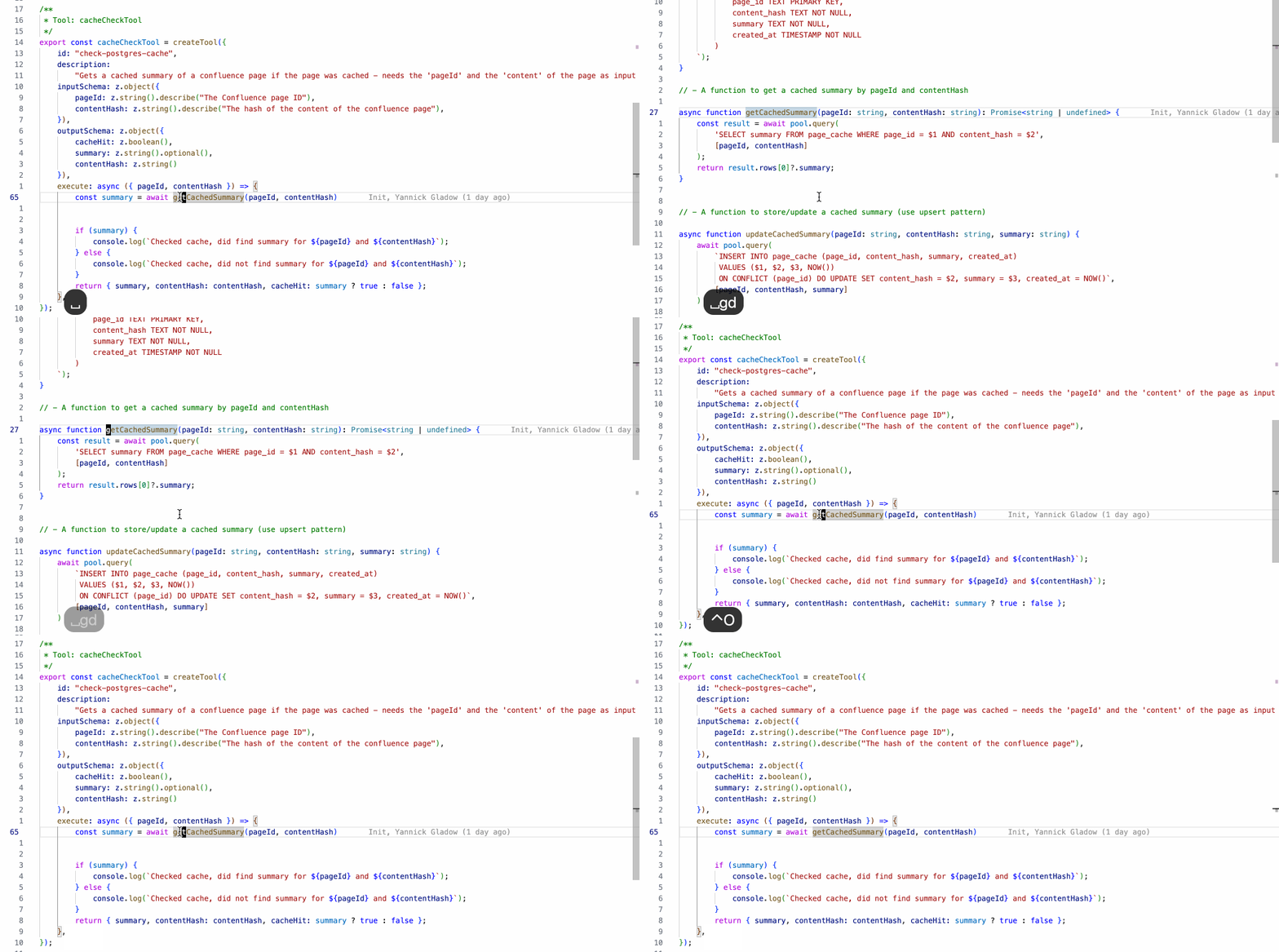
{ "before": ["<leader>", "g", "d"], "commands": ["editor.action.revealDefinition"] },
{ "before": ["<leader>", "g", "r"], "commands": ["editor.action.goToReferences"] },
{ "before": ["<leader>", "g", "i"], "commands": ["editor.action.goToImplementation"] },
{ "before": ["<leader>", "g", "s"], "commands": ["workbench.action.gotoSymbol"] },
{ "before": ["<leader>", "s", "d"], "commands": ["editor.action.peekDefinition"] },
And to go right back (or forward again) after looking at the defintion:
{ "before": ["<C-o>"], "commands": ["workbench.action.navigateBack"] },
{ "before": ["<C-i>"], "commands": ["workbench.action.navigateForward"] },
In the GIF below: <space>gd to jump to definition, then Ctrl-o to jump back:
Show Type Info
One of my most used bindings. Press K on anything to see its type and documentation:
{ "before": ["K"], "commands": ["editor.action.showHover"] },This works in visual mode too, so you can select an expression and check its type.
The cgn Workflow
This is pure vim magic and one of my absolute favorites. Want to rename something across your file without a refactoring tool?
- Put cursor on the word
- Press
*to search for it - Press
cgnto change the next occurrence - Type your replacement
- Press
Esc - Press
.to repeat on the next occurrence, ornto skip
No config needed, this is built into vim. And it is faster than refactoring in many cases, as it is not realying on any structural logic in the background.
Refactorings
Cursor's refactoring support is pretty good. I mapped them all to <leader>r:
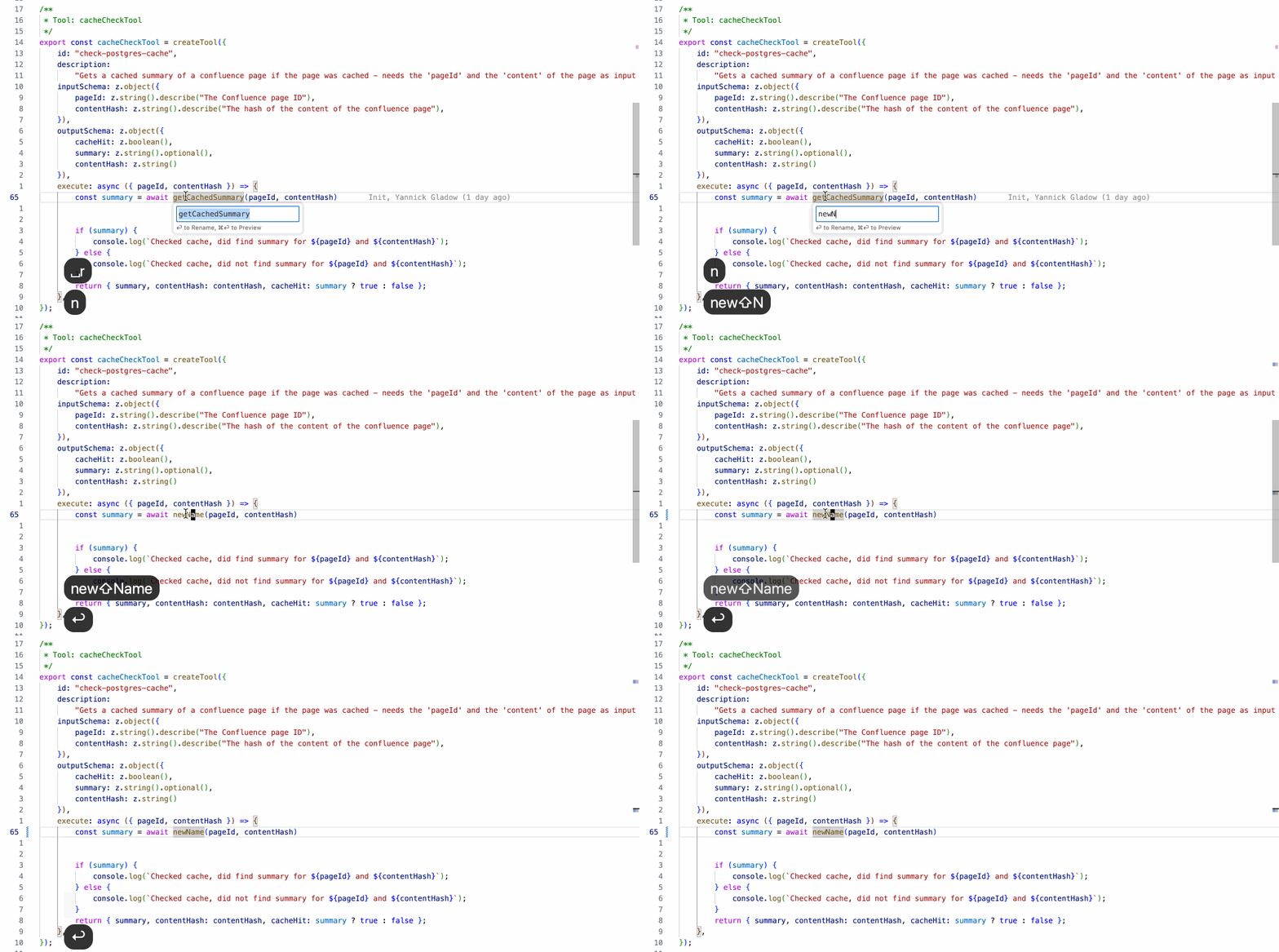
{ "before": ["<leader>", "r", "n"], "commands": ["editor.action.rename"] },
{ "before": ["<leader>", "r", "v"], "commands": ["editor.action.codeAction"] },
{ "before": ["<leader>", "r", "m"], "commands": ["editor.action.codeAction"] },
{ "before": ["<leader>", "r", "r"], "commands": ["editor.action.refactor"] },
{ "before": ["<leader>", "o", "i"], "commands": ["editor.action.organizeImports"] },
In the GIF below: <space>rn to rename the symbol under cursor:
Quick Fix and Formatting
Super important, the quickfix action opens the suggestion lightbulb menu:
{ "before": ["<leader>", "q", "f"], "commands": ["editor.action.quickFix"] },
{ "before": ["<leader>", "F"], "commands": ["editor.action.formatDocument"] },
Search
Navigating without the mouse means having good search bindings:
{ "before": ["<leader>", "f", "f"], "commands": ["workbench.action.quickOpen"] },
{ "before": ["<leader>", "f", "s"], "commands": ["workbench.action.showAllSymbols"] },
{ "before": ["<leader>", "f", "g"], "commands": ["workbench.action.findInFiles"] },
{ "before": ["<leader>", "f", "r"], "commands": ["workbench.action.replaceInFiles"] },
{ "before": ["<leader>", "f", "a"], "commands": ["workbench.action.showCommands"] },
Tests
Running tests right from your fingertips:
{ "before": ["<leader>", "g", "t"], "commands": ["testing.goToTest"] },
{ "before": ["<leader>", "t", "n"], "commands": ["testing.runAtCursor"] },
{ "before": ["<leader>", "t", "l"], "commands": ["testing.reRunLastRun"] },
{ "before": ["<leader>", "t", "f"], "commands": ["testing.reRunFailTests"] },
Navigation through Errors and Changes
Jump between errors and git changes:
{ "before": ["]", "c"], "commands": ["editor.action.marker.next"] },
{ "before": ["[", "c"], "commands": ["editor.action.marker.prev"] },
{ "before": ["]", "h"], "commands": ["workbench.action.editor.nextChange"] },
{ "before": ["[", "h"], "commands": ["workbench.action.editor.previousChange"] },
Other Useful Bits
Commenting, toggling the sidebar, clearing search highlights:
{ "before": ["<leader>", "c", "c"], "commands": ["editor.action.commentLine"] },
{ "before": ["<leader>", "n"], "commands": ["workbench.view.explorer"] },
{ "before": ["<leader>", "m"], "commands": ["workbench.action.toggleSidebarVisibility"] },
{ "before": ["<C-l>"], "commands": [":nohl"] },
{ "before": ["<leader>", "u", "h"], "commands": ["workbench.action.localHistory.openAll"] },
Downsides
There are some things I miss compared to IntelliJ or native Vim:
- No visual star plugin, can't press
*on a multi-word selection and then jump withn(need find for that:/{words I want}for that) - No yank history / paste multiple - IntelliJ's
PasteMultiplewas nice - Some minor quirks here and there
But overall, I'm pretty happy. The muscle memory is back, and I can enjoy Cursor's AI features while still feeling at home.
Full Vim Config (click to expand)
Add this to your Cursor settings.json:
"vim.leader": "<space>",
"vim.surround": true,
"vim.highlightedyank.enable": true,
"vim.highlightedyank.duration": 200,
"vim.replaceWithRegister": true,
"vim.hlsearch": true,
"vim.incsearch": true,
"vim.ignorecase": true,
"vim.smartcase": true,
"vim.useSystemClipboard": true,
"vim.scrolloff": 3,
"vim.visualbell": true,
"editor.lineNumbers": "relative",
"vim.handleKeys": {
  "<C-d>": true,
  "<C-u>": true,
  "<C-f>": false,
  "<C-p>": false,
  "<C-n>": true
},
"vim.normalModeKeyBindingsNonRecursive": [
  { "before": ["<C-l>"], "commands": [":nohl"] },
  { "before": ["<Esc>", "<Esc>"], "commands": [":nohl"] },
  { "before": ["<leader>", "n"], "commands": ["workbench.view.explorer"] },
  { "before": ["<leader>", "m"], "commands": ["workbench.action.toggleSidebarVisibility"] },
  { "before": ["<leader>", "c", "c"], "commands": ["editor.action.commentLine"] },
  { "before": ["<leader>", "r", "n"], "commands": ["editor.action.rename"] },
  { "before": ["<leader>", "r", "v"], "commands": ["editor.action.codeAction"] },
  { "before": ["<leader>", "r", "m"], "commands": ["editor.action.codeAction"] },
  { "before": ["<leader>", "r", "r"], "commands": ["editor.action.refactor"] },
  { "before": ["<leader>", "o", "i"], "commands": ["editor.action.organizeImports"] },
  { "before": ["<leader>", "q", "f"], "commands": ["editor.action.quickFix"] },
  { "before": ["<leader>", "F"], "commands": ["editor.action.formatDocument"] },
  { "before": ["<leader>", "g", "d"], "commands": ["editor.action.revealDefinition"] },
  { "before": ["<leader>", "g", "r"], "commands": ["editor.action.goToReferences"] },
  { "before": ["<leader>", "g", "i"], "commands": ["editor.action.goToImplementation"] },
  { "before": ["<leader>", "g", "s"], "commands": ["workbench.action.gotoSymbol"] },
  { "before": ["<leader>", "s", "d"], "commands": ["editor.action.peekDefinition"] },
  { "before": ["<leader>", "s", "p"], "commands": ["editor.action.triggerParameterHints"] },
  { "before": ["<leader>", "f", "f"], "commands": ["workbench.action.quickOpen"] },
  { "before": ["<leader>", "f", "s"], "commands": ["workbench.action.showAllSymbols"] },
  { "before": ["<leader>", "f", "g"], "commands": ["workbench.action.findInFiles"] },
  { "before": ["<leader>", "f", "r"], "commands": ["workbench.action.replaceInFiles"] },
  { "before": ["<leader>", "f", "a"], "commands": ["workbench.action.showCommands"] },
  { "before": ["<leader>", "g", "t"], "commands": ["testing.goToTest"] },
  { "before": ["<leader>", "t", "n"], "commands": ["testing.runAtCursor"] },
  { "before": ["<leader>", "t", "l"], "commands": ["testing.reRunLastRun"] },
  { "before": ["<leader>", "t", "f"], "commands": ["testing.reRunFailTests"] },
  { "before": ["]", "c"], "commands": ["editor.action.marker.next"] },
  { "before": ["[", "c"], "commands": ["editor.action.marker.prev"] },
  { "before": ["]", "h"], "commands": ["workbench.action.editor.nextChange"] },
  { "before": ["[", "h"], "commands": ["workbench.action.editor.previousChange"] },
  { "before": ["<leader>", "s", "e"], "commands": ["editor.action.showHover"] },
  { "before": ["<leader>", "u", "h"], "commands": ["workbench.action.localHistory.openAll"] },
  { "before": ["<C-o>"], "commands": ["workbench.action.navigateBack"] },
  { "before": ["<C-i>"], "commands": ["workbench.action.navigateForward"] },
  { "before": ["K"], "commands": ["editor.action.showHover"] }
],
"vim.visualModeKeyBindingsNonRecursive": [
  { "before": ["<leader>", "c", "c"], "commands": ["editor.action.commentLine"] },
  { "before": ["<leader>", "c", "b"], "commands": ["editor.action.blockComment"] },
  { "before": ["<leader>", "r", "n"], "commands": ["editor.action.rename"] },
  { "before": ["<leader>", "r", "v"], "commands": ["editor.action.codeAction"] },
  { "before": ["<leader>", "r", "m"], "commands": ["editor.action.codeAction"] },
  { "before": ["<leader>", "r", "r"], "commands": ["editor.action.refactor"] },
  { "before": ["<leader>", "f", "g"], "commands": ["workbench.action.findInFiles"] },
  { "before": ["K"], "commands": ["editor.action.showHover"] }
]